Saturday, April 25, 2026
The Spreadsheet That Ate the Business
The Spreadsheet That Ate the Business
Spreadsheet dependency is one of those problems that never announces itself. Nobody holds a meeting to decide that the company's core operations will run on a file one person maintains on their laptop. It just happens, one column at a time, until the day that person goes on holiday and everything downstream grinds to a halt.
A common pattern we see in consulting engagements: a company's primary system tracks work at the wrong level of granularity. It records individual components, but the business thinks in product families. "How many of Product X are available in September?" is a question that matters to five different departments, and the system cannot answer it.
So someone builds a spreadsheet.
From Quick Fix to Shadow Operating System
The spreadsheet starts small. It pulls data from the main system, reorganises it, and answers the question the system can't. It works. People are grateful. And that gratitude is the beginning of the problem.
Because once a spreadsheet proves useful, it attracts responsibilities. First it tracks stock availability. Then someone asks if it can also show staffing allocation for upcoming jobs. Then logistics coordination. Then accommodation bookings for field teams. Then invoice status. Then vehicle assignments. Then client pack progress.
Each addition makes sense in isolation. The person maintaining the spreadsheet is competent and willing. The alternative (getting the primary system to handle these questions) would take months of vendor negotiations, budget approvals, and configuration work. The spreadsheet takes an afternoon.
Within a year, something that started as a stock lookup has become the actual coordination layer for the business. Most of the senior leadership team are making daily decisions based on it. Not based on the system the company pays a licence fee for. Based on the spreadsheet.
The Fixes That Fail Archetype
Systems thinking has a name for this pattern: Fixes That Fail. It describes a loop where a symptomatic fix works in the short term but creates side effects that make the underlying problem worse over time.
The loop works like this:
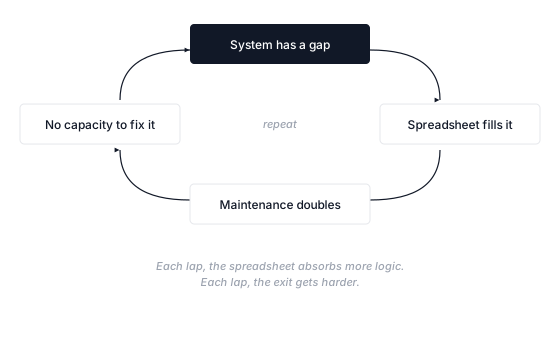
The system can't answer a question the business needs answered, so someone builds a spreadsheet. The business grows, the spreadsheet needs more maintenance, and the maintainer loses capacity to push for system improvements. The system stays static, more gaps appear, and the spreadsheet absorbs more logic.
Each lap around the loop, the spreadsheet accumulates business logic that exists nowhere else. The person maintaining it becomes a single point of failure that the organisation cannot afford to lose, reassign, or even send on a proper holiday.
In one engagement we ran, maintaining the spreadsheet consumed roughly two days a week of a single person's time. When that person was unavailable, the spreadsheet didn't update, and everyone who depended on it worked from stale data without realising it.
Leadership usually spots the danger eventually. The managing director of one company we worked with put it simply: the spreadsheet was starting to replace the system they were paying for, and nobody had decided that should happen.
That's the moment of recognition. But recognition alone doesn't break the loop.
Why Smart People Let This Happen
It's tempting to frame spreadsheet dependency as a failure of discipline or governance. It isn't. It's a rational response to a real constraint, and that's what makes it so persistent.
The people building these workarounds are usually the most capable operators in the business. They see a gap, they fill it, they keep things moving. In the short term, this is exactly what you want from your team. The problem is structural, not personal.
Three forces keep the loop spinning:
The workaround is invisible to investment decisions. When the leadership team evaluates whether to upgrade the primary system, they weigh the cost against the current level of pain. But the spreadsheet is absorbing the pain. It masks the true cost of the system's limitations. The business feels functional because one person is working 20 extra hours a week to make it functional. Remove the spreadsheet and the case for system investment becomes obvious overnight.
The switching cost compounds. Every week the spreadsheet runs, it accumulates more embedded logic, more dependencies, more institutional knowledge that exists only in one person's head. Migrating away from it gets harder the longer you wait. This is the same dynamic that keeps companies on legacy ERP systems for decades.
Nobody owns the decision. The person maintaining the spreadsheet doesn't have the authority to commission a system upgrade. The people who have that authority don't feel the pain directly (the spreadsheet shields them from it). The gap between "who experiences the problem" and "who can authorise the fix" is often the real blocker.
Organisations routinely underestimate how many spreadsheets they depend on. Felienne Hermans, who built the Spreadsheet Lab at TU Delft to study exactly this, found the problem so pervasive she spun out a company to assess spreadsheet risk. That's not a tooling problem. That's a systemic response to systems that don't do what the business needs them to do.
The Key Person Risk Nobody Budgets For
Spreadsheet dependency always creates key person dependency. The two are inseparable.
The person who built the spreadsheet understands its structure, its formulas, its quirks, its hidden assumptions. They know which columns update automatically and which need manual intervention. They know the workarounds within the workaround. None of this is documented, because the spreadsheet was never supposed to become infrastructure.
A McAfee and Frost & Sullivan survey found that over 80% of employees use SaaS applications not cleared by IT. Nearly all are harmless. But when one of those unsanctioned tools becomes the coordination layer for daily operations, the risk profile changes entirely.
What happens when the maintainer leaves? Gets promoted? Burns out from the invisible workload? The answer, in most cases, is that someone else inherits the spreadsheet, doesn't fully understand it, and starts a second spreadsheet to track the parts of the first one they can't figure out. The loop continues, now with an extra layer.
Breaking the Loop
The way out is not to ban spreadsheets. That's like banning painkillers instead of treating the injury. The spreadsheet is a symptom. The underlying problem is a gap between what the business needs and what its systems provide.
Make the cost visible. Quantify how many hours per week go into maintaining compensating tools across the organisation. Include not just the direct maintenance, but the downstream effects: meetings to reconcile conflicting data, decisions delayed because the spreadsheet wasn't updated, onboarding time for new staff who need to learn the shadow system. Leadership teams rarely see this number. When they do, priorities shift.
Map the logic, then close the gap. Before you can move away from the spreadsheet, you need to understand what it actually does. Not just its columns and formulas, but the decisions it supports, the questions it answers, the workflows it enables. This is the process mapping work that should precede any technology decision. The goal is to get the primary system (or a proper replacement) to answer the questions the business actually asks. Sometimes that means configuring existing software differently. Sometimes it means integrating two systems that don't talk to each other. Sometimes it means replacing a system that was outgrown three years ago. The spreadsheet tells you exactly which capabilities are missing. It's a requirements document written in Excel formulas.
Migrate incrementally. You cannot rip out a spreadsheet that five leaders depend on for daily decisions. Move one function at a time. Start with the data that changes most frequently (highest risk of staleness) or the data that the most people depend on (highest blast radius if wrong). Each function you migrate reduces the maintainer's workload and weakens the dependency loop.
The Broader Pattern
Spreadsheets are the default compensating tool, but they're not the only one. The same archetype plays out with Notion databases, Slack channels used as ticketing systems, shared Google Docs that track project status, and WhatsApp groups that serve as dispatch systems.
The pattern is always the same: a gap in the primary system, a capable person who fills it with whatever tool is at hand, gradual accumulation of responsibilities, and a growing cost that hides in plain sight.
If you recognise this pattern in your own organisation, the AI Readiness Assessment is a useful starting point. Not because AI solves spreadsheet dependency directly, but because the assessment surfaces the same structural questions: where does your data live, who maintains it, and what happens when they're not available. Those answers tell you more about your operational resilience than any technology evaluation.
The spreadsheet that ate the business didn't do it maliciously. It did it helpfully, one column at a time. The fix is not less helpfulness. It's building systems that don't require heroic workarounds to answer basic operational questions.